
0 €
14 days of Swept Path. No card.
- Every vehicle and every check
- Key sent by email
Tero is a growing set of modules for Archicad, made by the architects at Beletage. Swept paths come first. AI renders and films, an assistant that works in your model and GIS tools follow, all in the same installer.
One installer. One key unlocks every module you own.
Buy only what you use. The same key unlocks every module you own, in Archicad 27 to 30, on Windows and macOS. New modules arrive as updates.
Vehicle paths drawn live in your plan, with exact clearance, reversing, docking, ramps and headroom.
First at launch29 € project, 99 € year T-02The 3D view you are looking at, rendered with AI in about a minute, then clips, orbits and walk-throughs.
In developmentOn credits T-03Ask in plain language. It works in your model with Archicad's own tools, and you approve every change.
In developmentOn credits T-04GeoPackage and DXF in your national coordinate system, coordinate grids, spot coordinates and tables.
PlannedYearly licence T-05Tell us what slows you down in Archicad. The next module may start with your answer.
On requestWrite to usWill the fire engine make the corner? Will the semitrailer clip the bollards? Drag the route below and see. In Archicad, Tero does this live in your plan, forwards and in reverse, up ramps and under beams.
A simplified preview that runs in your browser. In Archicad, Tero sweeps the exact body in 5 cm steps, reverses, docks and checks ramps and headroom.
Click the route in plan. The swept area, wheel paths and clearances redraw at every click, with a small palette next to the cursor.
The body sweeps continuously in 5 cm steps against the walls, kerbs, columns and other routes you select, with your safety distance.
Back a semitrailer the way a driver would, or let Tero plan the manoeuvre into a loading bay, aligned with the ramp.
The vehicle rides your slopes and vertical curves on its four wheels. Tero checks ground clearance and the underside of beams, slabs and lintels.
Each route is a single library object. Move or rotate it with the usual tools, change the vehicle, and it recomputes from your steps.
Guides for parallel and perpendicular moves, your own safety distance, and vehicle values you can enter in Details.
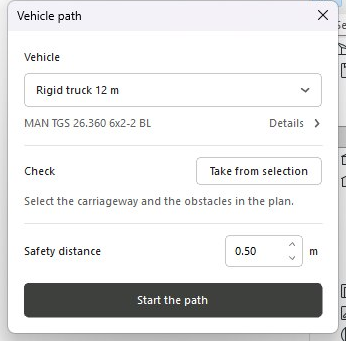
Thirteen are ready, from a car to a 16.5 m semitrailer, each with the chassis it is modelled on.
Take them from your selection and set the safety distance. Tero checks against exactly what you picked.
Forward, reverse or to a loading bay. Red means a conflict, and it moves as you move the route.
Every dimension comes from the manufacturer data sheet, and the add-on tells you which one. Drawn at the same scale. Missing one? We add it on request.
Render the 3D view you are looking at, in about a minute, then make it move. Already working in our add-on in Romania, coming to Tero next.


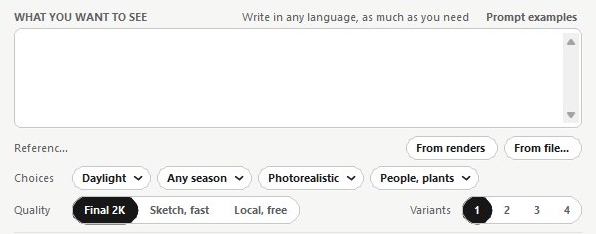
Pick the light, the season and the style, write what you want to see in any language, and choose a free local render, a quick sketch or a final 2K image. Up to four variants at a time, and you keep the one you like.
Ask in plain language. It reads your layers, zones and elements, works with Archicad's own tools, and nothing changes until you approve.
Illustration of the Assistant palette, with the kind of requests it handles.
Survey and GIS data in the coordinate system your country uses, into Archicad and back out again.
ETRS89 / UTM zone 32N
Tap a coordinate system on the plan to relabel the same site.
What slows you down in Archicad? Every Tero module started as a tool we needed ourselves. The next one may start with your answer.
Write one or two sentences about the task. We read every one, and we write back when a module you asked for, or one of those below, opens.
For one project or for the year, with no automatic renewal. The prices below are business prices excluding VAT. Consumer totals will include applicable VAT before ordering. Eligible businesses in other EU countries can use reverse charge with a valid VAT number.
14 days of Swept Path. No card.
90 days on one computer.
365 days on three activated computers, every module update included.
Render and Film and the Assistant run on credits. Geo will be a yearly licence. Everything works with the same key.
Hear firstInitially available in Romania and to businesses in other EU countries with a verified VAT number. More countries will follow. Terms of sale and withdrawal rights. In Romania, the project costs EUR 35.09 and the year EUR 119.79 including 21% VAT. No automatic renewal.

Tero is made by Beletage, an architecture practice in Cluj-Napoca, Romania. We build Archicad tools for our own projects first, and open them to everyone once they have proved themselves on our desks. You write to the people who make it.
beletage.roSwept Path. Render and Film, the Assistant and Geo follow in the same installer. Leave your email on sheet T-05 and you hear first.
The target is Archicad 27, 28, 29 and 30 on Windows and macOS. The download page lists the installers and compatibility that have been verified. We test with the international English version of Archicad.
Not by Swept Path. It computes everything on your computer and only checks your licence key online. The AI modules say clearly what they send, before they send it.
Yes. Start from the closest of the thirteen and enter your own values in Details, such as the wheelbase. If a vehicle is missing, send us its data sheet and we add it.
Beletage SRL, Romania, is the seller. Eligible businesses in other EU countries can use reverse charge with a verified VAT number. Purchases in Romania include 21% VAT. The final total is shown before payment. Consumer purchases are initially available only in Romania.
Beletage, an architecture practice in Cluj-Napoca, Romania. Tero brings the Archicad tools we build to architects in other countries.
We send a 14-day key and the installer link to your email. Paste the key into Archicad and the module opens.